SRT or VTT Subtitles - When To Make Them Yourself
Reach for Subtitle Generator - Make SRT and VTT Files when you need a timed caption file and the video must not leave your machine. Two different paths produce cues there, and picking the wrong one costs you either a download you did not need or an accuracy you never got.
Which of the two paths your job needs
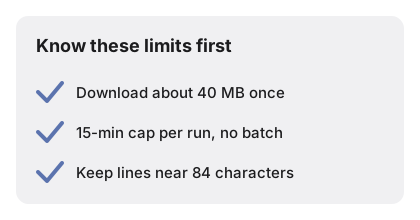
The first path is speech recognition. A compact Whisper model runs on your own device and writes the cue text for you, timed from its own segment boundaries. It costs one download of about 40 MB, fetched only when you click the button that names that size, and the browser keeps it afterwards.
The second path needs no model at all. If you already have the words - a script, a voice-over sheet, a transcript someone typed - paste them into the script box and each line is timed across the length of the file you picked. Nothing is downloaded, and the timing is arithmetic rather than a guess.
So the question is simply whether you already own the words. If you do, the manual path is faster and exact on spelling. If you do not, the recognition path is the only one that can invent them.
SRT or VTT, decided by where the file is going
Both formats come out of the same cue table on the page, so choosing is not a commitment and exporting both costs nothing. They differ in three visible details.
| Detail | SRT | VTT |
|---|---|---|
| First line of the file | The cue number, starting at 1 | The literal word WEBVTT |
| Separator before the milliseconds | Comma, as in 00:00:04,120 | Dot, as in 00:00:04.120 |
| Cue numbering | Every cue is numbered | Numbering is not required |
VTT is the format an HTML video element expects on a track, so it is the natural pick when the video will be embedded on a page. SRT is the older sidecar format that desktop players and subtitle editors have accepted for years, so it is the safer pick when you are handing the file to somebody else or importing it into an editor. When you genuinely do not know which the recipient wants, download both from the same run and let them delete one.
The numbers that decide whether the page fits the file
Four of the page's limits are fixed, and they are the ones worth knowing before you pick a file rather than after.
| Limit | Value | What it means for you |
|---|---|---|
| Model download | About 40 MB | Paid once, then kept by the browser |
| Longest media per run | About 15 minutes | Longer files are refused, with the real length named |
| Recognition window | 30 seconds, overlapping by 2 | The status line counts these off as it works |
| Shortest manual cue | 1.2 seconds | Very short lines still stay readable on screen |
| Manual line length | About 84 characters | Longer sentences are split at the sentence end, then at commas |
| Spoken languages | 12 named, plus auto-detect | Naming the language beats leaving it to detection |
When the fifteen-minute cap decides for you
Media longer than about fifteen minutes is refused outright, and the message names the length it actually measured so you know by how much you are over. There is no batch mode either, so a run is one file. A forty-minute recording therefore means cutting it into three or four pieces first, captioning each, and stitching the cue files afterwards - which also means shifting the timecodes of every piece after the first, by hand.
That is real work, and it is the honest reason to check the duration before you start rather than after the model has downloaded. For anything long enough to need splitting, decide up front whether captions are worth it or whether a plain transcript would serve.
When your container will not open at all
The page pulls the audio track straight out of the container using the browser's own decoder, which is why MP4, M4V, WEBM and MOV work alongside plain audio in MP3, WAV, M4A and OGG. It is also why the list stops there. There is no server standing behind the page to take over, so a container the browser cannot decode cannot be transcribed here at all, and MKV is the case people hit most.
The fix is upstream: remux the file into MP4 first, then bring it back. Nothing about the caption run changes once the audio is reachable.
When a plain transcript is what you actually wanted
Cues are the right output when something will play the text back in time with the audio. If instead you want a paragraph you can read, quote or paste into a document, the timecodes are in your way, and Speech to Text is the page built for that shape.
The two pages share the same cached model, so trying one and then moving to the other does not mean downloading twice.
What you will still fix by hand
The recognition model is deliberately small, which is what makes it practical to download at all. Expect to correct proper nouns, jargon and punctuation before you publish, and expect to do that in the cue table on the page, where every cue's text is editable and the download rebuilds itself from whatever the table says.
Two specific artefacts are worth watching for. Because the recognition windows overlap by two seconds and that overlap is not de-duplicated, a word sitting exactly on a seam can appear at the end of one cue and again at the start of the next. And because editing a cue's text does not re-time it, a line you rewrite much shorter or much longer keeps its original start and end, so a long rewrite may want a manual trim.
What the page will not do
It does not burn captions into the picture; the output is a separate file you load alongside the video. It does not translate, so the cues come back in the language that was spoken. Cues are segment-level rather than word-level, so karaoke-style highlighting is out of scope. Nothing you load or produce is kept past the session, there is no watermark on the output, and there is no account or paid tier to reach first. When one of those limits rules the page out for your file, Subtitle Generator vs Auto-Caption Services compares it against a cloud caption service, a desktop subtitle editor, and a local Whisper install.
Why trust these tools
- Ten-plus years of web tooling. The freetoolonline editorial team has shipped browser-based utilities since 2015. The goal has never changed: get you to a working output fast, without an install.
- No install, no sign-up. Open a tool and get a working output in seconds - nothing to download and no account to create. Tools that need heavy processing run it on our service, so even a low-powered machine gets the job done.
- Analytics stops at the page view. We measure which pages get visited, not what you type or upload inside a tool. There is nothing to sign in to and no profile is attached to your input.
- Open-source core components. The processing engines underneath (libheif, libde265, pdf-lib, terser, clean-css, ffmpeg.wasm, and others) are public and audit-able. We link to each one in its tool page's footer.
- Free, with or without ads. All tools are fully functional without sign-up. The Disable Ads button in the header is always available if you need a distraction-free run.