Subtitle Generator vs Auto-Caption Services
Four other kinds of tool make caption files, and each beats Subtitle Generator - Make SRT and VTT Files at something. Knowing which one wins for the file in front of you saves more time than any setting on any of them.
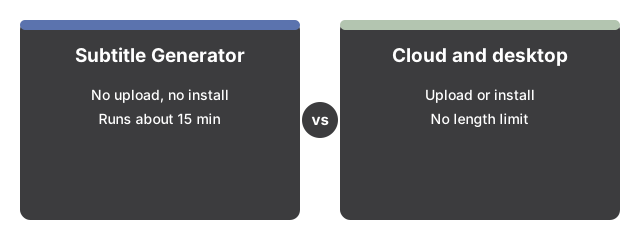
The five options, on the axes that actually differ
| Approach | Does the file leave your device | Install needed | Length limit | Edit cues before export |
|---|---|---|---|---|
| This page | No, recognition runs in the tab | No, one 40 MB model fetch | About 15 minutes per run | Yes, in the cue table |
| Captions from the video host | Yes, the video must be published there | No | Set by the host | Only if it offers an editor |
| Cloud caption service | Yes, uploaded for processing | No | Varies, check the free tier | Usually yes, in their editor |
| Desktop subtitle editor | No | Yes, an application | None in practice | Yes, this is its strength |
| Whisper on the command line | No | Yes, plus a terminal | None in practice | Only by editing the file after |
Captions from the video host
If the video is going onto a platform that captions what you publish, the cheapest path is often to publish it and let the host do the work. You write nothing and time nothing.
The trade is structural rather than about quality. The video has to be uploaded and published before any cues exist, so this is no help for a file you are not publishing, for a client review copy, or for anything confidential. The cues also live inside that player, so whether you ever get a portable SRT out depends on whether an export exists. And you cannot caption a file before it goes up - which is exactly when captions are usually reviewed.
Cloud caption services
Services that run recognition on their own hardware can use models far larger than a browser will hold, and that shows in accuracy on hard audio: crosstalk, accents, background noise, technical vocabulary. If transcription quality is the whole job and the material is not sensitive, this is the strongest option on the list.
Two things follow from where the work happens. The file must be transferred to them, which decides the matter outright for medical, legal, HR or unreleased material. And because the compute costs them money, the shape of the free tier is where these services differ most from each other - so the thing to read before you upload is what happens at export time, not what the landing page claims about accuracy.
Desktop subtitle editors
A dedicated subtitle editor is better than this page at everything after recognition. Frame-accurate nudging against a waveform, reading-speed checks, splitting and merging cues, restyling, format conversion - that is what those applications exist for, and no browser page competes with them on it.
What they generally do not do is invent the words. They are editors, so the usual workflow is to bring cues in from somewhere else. That makes them a companion to this page rather than a rival: recognise here, export SRT, then open that SRT in the editor for the fine work. Both formats this page writes import cleanly.
Whisper on the command line
The same family of model this page uses is available as a local install, and there you can run sizes a browser tab cannot hold. That is the accuracy ceiling for staying on your own machine, with no length cap worth mentioning and batch processing over a whole folder.
The cost is setup and comfort. You install software, you work in a terminal, and you handle the output files yourself. For somebody who captions video regularly that is an afternoon well spent. For one file this week it is not, which is the gap the browser page fills.
Where this page genuinely wins
Three cases, and they are narrow but common. The file must not leave the machine and you will not install anything - that rules out the first three options and the last one, and leaves this. You need a caption file before publishing, not after, so the host cannot help. Or you already have the words, in which case the script-timing path needs no model at all, spells every name correctly, and produces a timed file in one pass - something a recognition service structurally cannot beat, because it is guessing at words you already have.
Its honest limits are the mirror of that. The model is small, so names, jargon and punctuation want a pass in the cue table. Runs stop at about fifteen minutes and one file at a time. Containers are limited to what the browser can decode, with MKV the common casualty and no server to fall back on. And it transcribes only - it does not translate the cues, and it does not burn them into the picture.
A reasonable default
For a short video that is not published yet, start here: no upload, no install, and a file in hand within a few minutes. If the audio defeats the small model, escalate to a cloud service when the material allows it or to a local Whisper install when it does not. If the cues are nearly right but the timing needs polish, export SRT and finish in a desktop editor. If you want a readable paragraph rather than timed cues, Speech to Text shares the same cached model and produces that shape instead. Once you have picked this page over the alternatives, How To Generate SRT Subtitles - Step By Step walks through the six-move run in full, or the two moves when you already have the script.
Why trust these tools
- Ten-plus years of web tooling. The freetoolonline editorial team has shipped browser-based utilities since 2015. The goal has never changed: get you to a working output fast, without an install.
- No install, no sign-up. Open a tool and get a working output in seconds - nothing to download and no account to create. Tools that need heavy processing run it on our service, so even a low-powered machine gets the job done.
- Analytics stops at the page view. We measure which pages get visited, not what you type or upload inside a tool. There is nothing to sign in to and no profile is attached to your input.
- Open-source core components. The processing engines underneath (libheif, libde265, pdf-lib, terser, clean-css, ffmpeg.wasm, and others) are public and audit-able. We link to each one in its tool page's footer.
- Free, with or without ads. All tools are fully functional without sign-up. The Disable Ads button in the header is always available if you need a distraction-free run.