How to Check a Vehicle for Open Recalls - Step by Step
The vehicle recall lookup answers one question: does this vehicle have open US safety recalls? You enter a 17-character VIN or the year, make, and model; the page pulls the matching NHTSA campaigns and lists them newest first. Nothing to install, no account - here is each step.
Step 1 - open the page
Go to the vehicle recall lookup. An example lookup renders the moment the page loads, so you can see what results look like before typing anything - the layout you see for the example is exactly what your own query returns.
Step 2 - pick a mode and enter the vehicle
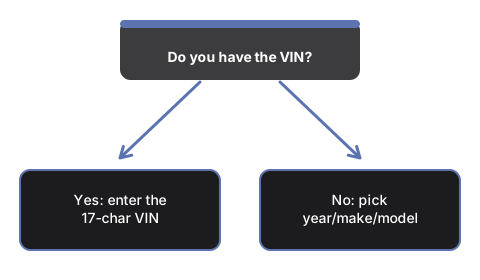
The fastest path is the vehicle mode: pick the model year from the dropdown, then type the make and model - both fields offer suggestion lists as you type. If you have the VIN (the 17-character plate at the base of the windshield or on the driver-door jamb), switch to the VIN mode instead: the page decodes the year, make, and model with the official NHTSA vPIC service first, shows you what it decoded, then pulls the matching campaigns.
Step 3 - read the campaign cards
Each campaign card shows the campaign number, report date, affected component, the problem, the safety risk, and the fix, newest first. High-severity flags render as badges straight from the NHTSA data: do-not-drive (park it), park-outside (fire risk), and over-the-air update. A no-recalls result states plainly that NHTSA lists no active campaign for the query, with a link to confirm at nhtsa.gov/recalls.
Step 4 - act on a match
Recall repairs are performed free of charge by the manufacturer's authorized dealers. Call a dealer for your brand, mention the campaign number from the card, and book the repair. If a badge says do-not-drive or park-outside, follow it before the appointment, not after. Keep in mind the results are model-level campaigns - whether a specific car already had its repair completed is confirmed by the dealer or the nhtsa.gov VIN search.
Not sure this is the right moment for a check? See when a recall lookup pays off, or compare it against the other ways to check recalls.
Why trust these tools
- Ten-plus years of web tooling. The freetoolonline editorial team has shipped browser-based utilities since 2015. The goal has never changed: get you to a working output fast, without an install.
- No install, no sign-up. Open a tool and get a working output in seconds - nothing to download and no account to create. Tools that need heavy processing run it on our service, so even a low-powered machine gets the job done.
- Analytics stops at the page view. We measure which pages get visited, not what you type or upload inside a tool. There is nothing to sign in to and no profile is attached to your input.
- Open-source core components. The processing engines underneath (libheif, libde265, pdf-lib, terser, clean-css, ffmpeg.wasm, and others) are public and audit-able. We link to each one in its tool page's footer.
- Free, with or without ads. All tools are fully functional without sign-up. The Disable Ads button in the header is always available if you need a distraction-free run.