Sort text lines step by step: alphabetize a list in your browser
The free Sort Text Lines tool on this site reorders a block of text one line at a time, A-Z or Z-A, entirely in your browser. This guide walks through the exact steps and explains how the tool decides the order.
freetoolonline.com Editorial TeamHow to sort your lines
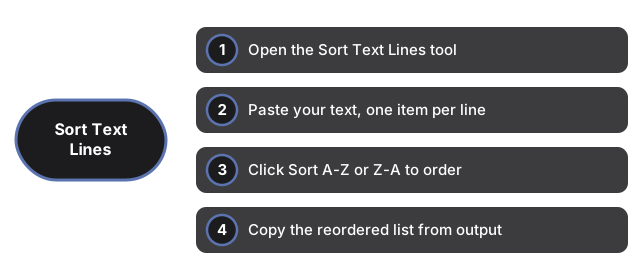
- Open the Sort Text Lines tool.
- Type or paste your text into the input box, keeping one item on each line - the tool treats every line break as the boundary between two items.
- Click Sort A-Z to order the lines ascending, or Sort Z-A to order them descending.
- Read the reordered list in the output box below and copy it out. Click the other button any time to flip the order.
Sort A-Z vs Sort Z-A
| Button | Order | Example input | Example output |
|---|---|---|---|
| Sort A-Z | Ascending (first letter first) | cherry / apple / banana | apple / banana / cherry |
| Sort Z-A | Descending (reverse of A-Z) | cherry / apple / banana | cherry / banana / apple |
How the sort order is decided
Sorting uses the browser's built-in locale-aware string comparison, so lines are ordered letter by letter. Two things are worth knowing before you trust the result:
- Capitalization groups together. The upper- and lower-case versions of the same word sort next to each other, so "apple" and "Apple" end up adjacent rather than in two separate blocks.
- Numbers are compared as text, not as values. Because each line is compared character by character, "10" and "100" sort before "2" (the tool reads the leading "1" before the "2"). For a list of plain numbers, pad them to the same width - "02", "10", "100" - to get the numeric order you expect.
Common uses
Alphabetizing a list of names or email addresses; putting a set of tags, keywords, or CSS classes in order; ordering the lines of a config or a word list before running a diff so the two sides line up; or simply tidying a pasted list so duplicates and gaps are easier to spot by eye.
Sort Text Lines vs a spreadsheet or desktop editor
A spreadsheet can sort a column, but you first have to paste the list into a cell range, select it, and open a sort dialog; a desktop code editor can sort selected lines but usually needs a plugin or a command. Sort Text Lines is a single box with two buttons - no upload, no import step, and no install - which makes it faster when the list is not already sitting inside a document. For heavy data work with multiple columns or numeric sorting, a spreadsheet is still the better fit.
| Method | Steps to sort 20 lines | Install or account needed |
|---|---|---|
| Sort Text Lines (this tool) | 2 | No |
| Microsoft Excel | 5 | Yes |
| VS Code (with extension) | 4 | Yes |
Privacy
Sorting runs entirely in your browser tab using plain JavaScript. Nothing you type or paste is uploaded, sent to an analytics service, or written to any server - refreshing or leaving the page clears the box, with no history and no account.
Companion guides
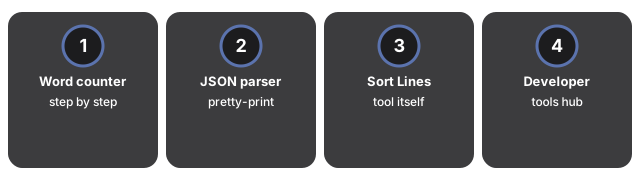
- Word counter step by step - another browser-only text tool, for counting instead of sorting.
- JSON parser - for validating and pretty-printing a JSON payload instead of ordering plain lines.
- Sort Text Lines tool - the tool itself.
- Developer tools hub - the full set, every one running in-browser with no upload.
Frequently asked questions
How does the tool know where one item ends and the next begins?
Each line is one item. The tool splits your text on line breaks, sorts the resulting list, and joins it back with line breaks, so put exactly one entry on each line.
Why did "10" end up before "2" in my sorted list?
Lines are compared as text, character by character, not as numbers, so "10" comes before "2" because "1" comes before "2". To sort plain numbers in numeric order, pad them to the same number of digits first (02, 10, 100).
Can I undo a sort or get my original order back?
The output box holds the sorted result; your original text stays in the input box until you change it. Sorting does not overwrite the input, so you can click Sort A-Z and Sort Z-A as often as you like to compare both orders.
Is my text uploaded or saved anywhere?
No. Sorting runs entirely in your browser; nothing you type or paste is sent to a server, and nothing is saved once you refresh or leave the page.
Why trust these tools
- Ten-plus years of web tooling. The freetoolonline editorial team has shipped browser-based utilities since 2015. The goal has never changed: get you to a working output fast, without an install.
- No install, no sign-up. Open a tool and get a working output in seconds - nothing to download and no account to create. Tools that need heavy processing run it on our service, so even a low-powered machine gets the job done.
- Analytics stops at the page view. We measure which pages get visited, not what you type or upload inside a tool. There is nothing to sign in to and no profile is attached to your input.
- Open-source core components. The processing engines underneath (libheif, libde265, pdf-lib, terser, clean-css, ffmpeg.wasm, and others) are public and audit-able. We link to each one in its tool page's footer.
- Free, with or without ads. All tools are fully functional without sign-up. The Disable Ads button in the header is always available if you need a distraction-free run.