When to Use the Parker Solar Probe 3D Explorer
Open the Parker Solar Probe 3D Explorer when you want a fast, real-dates answer to how a spacecraft actually gets close enough to the Sun to touch it, and how close NASA's Parker Solar Probe really got.
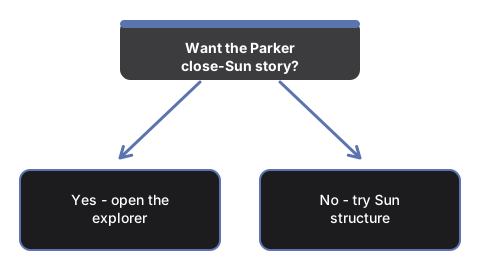
Sessions this explorer fits
Students and teachers explaining gravity-assist trajectory design, readers who want the real numbers behind "fastest human-made object ever" instead of a headline without a source, and anyone curious how a heat shield keeps a spacecraft alive a few million miles from the Sun's surface all get a direct answer here.
When another explorer answers your question better
Skip this page if what you actually want is the Sun's own internal layers - core, radiative zone, convection zone - because that story lives on the Sun Structure 3D Explorer. It is also the wrong page for comparing a different mission's dramatic ending at another world, such as Cassini's final plunge into Saturn, which the Cassini Grand Finale 3D Explorer covers instead. Once you have confirmed the Parker close-approach story is what you need, walk through the controls in the step-by-step guide.
Why trust these tools
- Ten-plus years of web tooling. The freetoolonline editorial team has shipped browser-based utilities since 2015. The goal has never changed: get you to a working output fast, without an install.
- No install, no sign-up. Open a tool and get a working output in seconds - nothing to download and no account to create. Tools that need heavy processing run it on our service, so even a low-powered machine gets the job done.
- Analytics stops at the page view. We measure which pages get visited, not what you type or upload inside a tool. There is nothing to sign in to and no profile is attached to your input.
- Open-source core components. The processing engines underneath (libheif, libde265, pdf-lib, terser, clean-css, ffmpeg.wasm, and others) are public and audit-able. We link to each one in its tool page's footer.
- Free, with or without ads. All tools are fully functional without sign-up. The Disable Ads button in the header is always available if you need a distraction-free run.