On-Device Paraphrasing Tool - When To Use It
freetoolonline.com Editorial TeamUse the AI Paraphrasing Tool (On-Device) when a passage needs different wording but must not be pasted into a cloud service. The rewrite runs on your own device on every path the page offers, so nothing you paste is uploaded anywhere. Whether it fits a given text comes down to sensitivity, tone, and the polish you expect.
Nothing you paste leaves the machine
There is no rewriting server behind the page. The new wording is produced on your own device - by the browser's built-in rewriting AI where Chrome ships it, or by a small open model you download with one explicit click. Your text is not stored past the page session, is not sent to any analytics service, and no account or signup is asked for on any path.
That settles the question for anything under a confidentiality duty: a client email, an internal report, an application letter you would rather keep to yourself. For text that is already public, privacy stops deciding, and the choice moves to tone and effort below.
Pick the tone, keep the meaning
One tone selector steers the whole rewrite, and the meaning is preserved on every setting - only the wording changes. Four tones are offered:
| Tone | What it does to the wording | A job it fits |
|---|---|---|
| Neutral | Plain, even wording | Tidying a rough first draft |
| Formal | Tightened for a report or application | A status update going to management |
| Casual | Loosened for a chat message | Softening a stiff announcement |
| Simpler wording | Same register, easier constructions | Instructions a broad audience must follow |
The tone dial is also where the "make this sound friendlier" job lives. Rewording a stiff paragraph into something warmer, or the reverse, is the same rewrite with a different tone picked - there is no separate tone-changer page to hunt for.
Three paths to a rewrite, priced
Any of three engine paths can produce the output, and a status line under the result always names which one did the work, so you know what you are reading.
| Path | First cost | Where it works |
|---|---|---|
| Built-in browser rewriting AI | Zero download | Chrome versions that ship it; the page feature-detects it and never assumes it is there |
| On-device model | One download on an explicit click, size shown next to each model before it starts | Modern browsers; up to 8,000 characters per run |
| Prepared sample demo | Zero download | Every browser; a wordy sample and its plainer rewrite are visible the moment the page loads |
A first draft, honestly labeled
The small models the page can load - Llama 3.2 1B by default, Llama 3.2 3B and Phi 3.5 mini as upgrades - produce a solid first draft, and the page says so plainly: review the rewrite before sending or publishing, because a small model can occasionally drop a nuance or flatten a detail a larger cloud rewriter would keep.
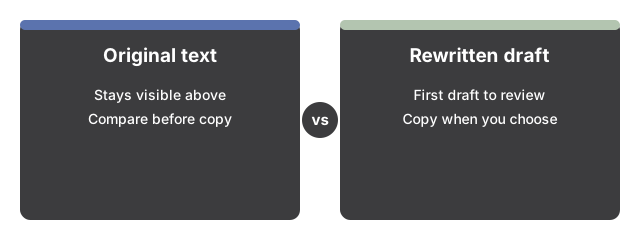
Two design choices keep you in control of that draft. The original stays in the input box above the result, so the two versions sit one above the other for a direct comparison before you decide. And a Copy result button moves the rewrite to the clipboard only when you choose to take it.
The second rewrite is cheaper than the first
Model weights are cached by the browser after the one-time download, so later rewrites on the same machine skip the download entirely. The cache and the last-model choice are shared with the Private AI Chat page - load a model once and both pages reuse it. A "Clear cached models" button removes the downloaded weights whenever you want the disk space back.
When this page is the wrong tool
Five limits are fixed, and knowing them up front saves a wasted visit. Input on the model path is capped at 8,000 characters, and longer text is cut to fit - the cap is stated right in the page copy. Rewrites are validated for English only; other languages are not a supported claim. There is no document upload - a DOCX or PDF must give up its text first, because only pasted text goes in. The page makes no plagiarism claim in either direction: it is not a plagiarism remover, and no rewrite is promised to pass an originality check. And there is no offline promise - the weights are cached after the first download, but the page itself still loads like any web page.
One neighbouring job is deliberately left out: fixing grammar while keeping your exact wording. That is the AI Grammar Checker's job - this page changes the wording on purpose.
Where to go from here
For the run itself - what is already on the page when it loads, which control to touch in which order - see Paraphrase Text On Your Device - Step by Step. To weigh this page against cloud rewriters and the neighbouring grammar page, see On-Device Paraphrasing vs Cloud Rewriters.
Why trust these tools
- Ten-plus years of web tooling. The freetoolonline editorial team has shipped browser-based utilities since 2015. The goal has never changed: get you to a working output fast, without an install.
- No install, no sign-up. Open a tool and get a working output in seconds - nothing to download and no account to create. Tools that need heavy processing run it on our service, so even a low-powered machine gets the job done.
- Analytics stops at the page view. We measure which pages get visited, not what you type or upload inside a tool. There is nothing to sign in to and no profile is attached to your input.
- Open-source core components. The processing engines underneath (libheif, libde265, pdf-lib, terser, clean-css, ffmpeg.wasm, and others) are public and audit-able. We link to each one in its tool page's footer.
- Free, with or without ads. All tools are fully functional without sign-up. The Disable Ads button in the header is always available if you need a distraction-free run.