Private Text Summarizer - When To Use
Reach for Text Summarizer - Private, In Your Browser when the text should not leave your machine. Three engines can produce the summary and all three run inside the page, so the only open question is which one suits the job.
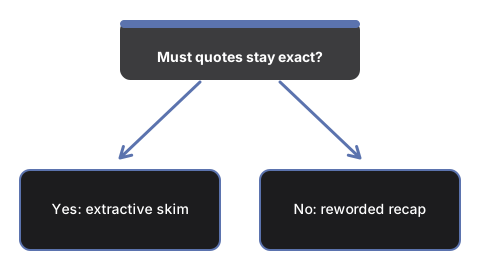
A quick skim, or wording you will paste into a report
For a fast read of a long article, the no-model pass that already runs when the page opens is usually enough: it hands back the source sentences carrying the most repeated words, in the author's order. For wording that goes into a report, load a small on-device model first - it writes fresh sentences instead of quoting.
When the no-model pass is enough
That pass scores sentences by word frequency and returns the top few, so it suits a source that states its point in one sentence and struggles when the point is spread across a paragraph. It rewords nothing, which makes it the safe pick when a quotation has to stay exact. "Short paragraph" returns two of those sentences, "Detailed summary" five, "Key bullet points" the same five as a dash list.
When the 8000-character cap matters
Only the on-device model path trims. Past 8000 characters the input is cut before the model reads it, and the label above the result then says the input was truncated to 8000 chars to fit the model context. The counter under the text box keeps a running character total, so you can tell in advance. A long document that has to go through a model belongs in one section at a time.
When the chat page fits better
Private AI Chat - In Your Browser, No Upload stores its model under the same key this page uses, so weights fetched on either page are already present for the other and no second download happens. Go there when one summary will not settle the question and you want to keep asking about the same passage.
When a cloud summarizer is the wrong call
A cloud service has to receive the text before it can answer, which is a bad trade for a contract, a medical letter, or anything under a confidentiality duty. This page uploads nothing and calls no server of its own on any engine; the only bytes it fetches are model weights, and only after you ask. Send text to a hosted service when it is already public.
Why trust these tools
- Ten-plus years of web tooling. The freetoolonline editorial team has shipped browser-based utilities since 2015. The goal has never changed: get you to a working output fast, without an install.
- No install, no sign-up. Open a tool and get a working output in seconds - nothing to download and no account to create. Tools that need heavy processing run it on our service, so even a low-powered machine gets the job done.
- Analytics stops at the page view. We measure which pages get visited, not what you type or upload inside a tool. There is nothing to sign in to and no profile is attached to your input.
- Open-source core components. The processing engines underneath (libheif, libde265, pdf-lib, terser, clean-css, ffmpeg.wasm, and others) are public and audit-able. We link to each one in its tool page's footer.
- Free, with or without ads. All tools are fully functional without sign-up. The Disable Ads button in the header is always available if you need a distraction-free run.