On-Device AI Translator vs Cloud Translators
freetoolonline.com Editorial TeamFour different kinds of machinery answer "translate this for me", and they make opposite trades. This page compares cloud translation services against the three local engines on AI Translator - Private, In Your Browser, so you can pick by what the text needs instead of by habit.
The whole trade in one table
| Question | Cloud service | Built-in browser engine | On-device model | Phrasebook |
|---|---|---|---|---|
| Where does the text go? | To the provider's servers | Stays on the device | Stays on the device | Stays on the device |
| What do you download first? | Nothing | Nothing from this site | About 115 MB per pair, once | Nothing |
| Which browsers? | Any | Chrome 138 and newer | Any modern browser | All of them |
| Coverage | Very wide | The browser's own language packs | 11 pairs, English on one side | 8 set phrases, 7 languages |
| Works offline later? | No | Once its pack is present | Yes, after the one download | Yes, always |
Privacy is a structural difference, not a policy one
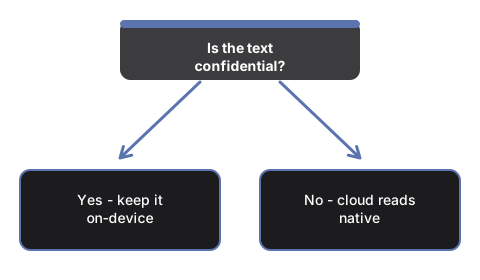
A cloud service must receive your text before it can translate a word of it - that is what "cloud" means, and no privacy policy changes the direction the bytes travel. The on-device page makes the opposite promise structurally: it has no translation server, so on every one of its three engines the text stays on your machine. It does not log input to analytics and keeps nothing past the session. For a contract, a medical result, or an internal document, that difference is the whole decision. For a public sentence, it is worth nothing - which is exactly when the cloud's strengths get to count.
Quality: the honest ranking
Large cloud services sit at the top for fluency, idiom and rare language pairs, and an on-device model does not pretend otherwise. The downloadable model here is about 78 million parameters - deliberately small enough to ship as a 115 MB download - and it produces solid everyday sentences while landing below cloud output on slang, idiom and unusual wordings. The page states that bound itself when a run completes. The browser's built-in engine generally sits between the two, and the phrasebook does not rank at all: its eight phrases per language were checked by hand once and simply are correct, in the language's native spelling.
The working rule that falls out: private or routine text on-device, public text where polish matters in the cloud, and anything important gets a human review whichever engine produced it.
Coverage: wide versus honest
Cloud services win coverage outright - over a hundred languages, any-to-any. The on-device models pair English with Spanish, French, German, Italian, Portuguese, Indonesian, Vietnamese, Hindi, Chinese, Russian and Arabic, and English must be one side; a pair between two non-English languages is not offered for download. What the page refuses to do is bluff: pick a pair the model path cannot serve and it says what the built-in engine can offer for that pair on your machine, or says plainly that only the phrasebook applies. Portuguese rides a Romance-group model with a target token - handled invisibly, mentioned here only so the pair list makes sense.
The first-run cost, spelled out
Cloud translation costs no download and starts instantly - the price is the upload of the text itself, every time. The built-in browser engine costs nothing from this site; where Chrome needs its own language pack it fetches one, and the status line names it as the browser's pack. The on-device model costs one download of about 115 MB per language pair, announced on the button before it starts, with a progress bar while it arrives - and the browser keeps the weights, so the pair works offline on every later visit. The phrasebook costs nothing, ever, and answers eight everyday phrases in seven languages the moment the page opens.
Two jobs that only look similar
Documents are a different job: nothing here reads a PDF or DOCX - text goes in as text, up to 4,000 characters per run. And the other "translator" on this site is a cipher, not a language: Morse Code Translator encodes and decodes Morse, which no language pair covers.
Which to pick
Confidential or personal text: the on-device page, with the phrasebook as the everywhere-floor. Public text that has to read natively: a large cloud service, reviewed by a human when it matters. A quick set phrase for a trip: the phrasebook, two clicks, nothing downloaded. When on-device is the answer, Offline AI Translator - When To Use One settles the borderline cases, and Translate Text On Your Device - Step by Step walks the first run through button by button.
Why trust these tools
- Ten-plus years of web tooling. The freetoolonline editorial team has shipped browser-based utilities since 2015. The goal has never changed: get you to a working output fast, without an install.
- No install, no sign-up. Open a tool and get a working output in seconds - nothing to download and no account to create. Tools that need heavy processing run it on our service, so even a low-powered machine gets the job done.
- Analytics stops at the page view. We measure which pages get visited, not what you type or upload inside a tool. There is nothing to sign in to and no profile is attached to your input.
- Open-source core components. The processing engines underneath (libheif, libde265, pdf-lib, terser, clean-css, ffmpeg.wasm, and others) are public and audit-able. We link to each one in its tool page's footer.
- Free, with or without ads. All tools are fully functional without sign-up. The Disable Ads button in the header is always available if you need a distraction-free run.