AI Background Remover vs Alternatives
AI Background Remover is one of three common ways to remove a background: a browser-based tool like this one, a desktop application, or an upload-based online service. Each makes a different trade-off on where your file goes and what you need installed.
freetoolonline.com Editorial TeamComparison table
Comparison table rows put file-stays-on-device, no install, no account, and offline-after-first-load next to typical install-and-account removers so you can scan the tradeoffs before you pick.
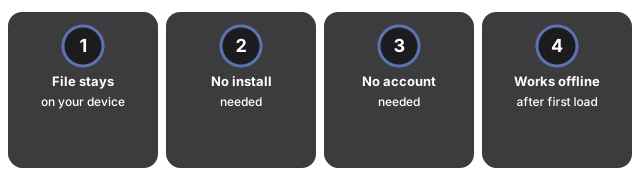
| Aspect | AI Background Remover (this tool) | Desktop application | Upload-based online service |
|---|---|---|---|
| Where your file goes | Stays on your device | Stays on your device | Uploaded to a server |
| Install required | No | Yes | No |
| Account required | No | No | Varies by service |
| Works offline (after first load) | Yes - model cached locally | Yes | No |
| Batch processing | One image at a time | Often supported | Often supported |
| Output format | Transparent PNG | Multiple formats | Varies |
When this tool is the right pick
Choose this tool when privacy is a priority - your image stays in your browser and is never sent to an external service. It also works well for occasional one-off images where installing a desktop app is not worth the effort.
The first run downloads the AI model once (about 26 MB); it is then cached offline. All subsequent uses are instant with no network required.
What this tool will not do
What this tool will not do: the AI applies its cut-out edge as-is with no brush or slider to refine the result. For photos with hair, fur, or subjects with translucent or soft edges, a desktop tool with a manual refine brush will give cleaner results. Output is always a transparent PNG; the tool does not replace the background with a color or a new image, and it processes one image per run - for batch removal a desktop application or API service is more practical.
Frequently asked questions
Is this as accurate as a paid service?
The tool uses two openly licensed engines: the MODNet AI model (Apache-2.0), which performs best on portraits and people, and an instant color-key mode for photos taken on a solid background. For complex fine-hair or transparent-object edges, a specialized paid service may produce cleaner results.
Can I process more than one image at a time?
The tool handles one image per run. For batch removal, a desktop application or API-based service is more practical.
See also: AI background remover - when to use it for a task-by-task guide to which photo types benefit most and when a desktop tool wins on edge detail.
Why trust these tools
- Ten-plus years of web tooling. The freetoolonline editorial team has shipped browser-based utilities since 2015. The goal has never changed: get you to a working output fast, without an install.
- No install, no sign-up. Open a tool and get a working output in seconds - nothing to download and no account to create. Tools that need heavy processing run it on our service, so even a low-powered machine gets the job done.
- Analytics stops at the page view. We measure which pages get visited, not what you type or upload inside a tool. There is nothing to sign in to and no profile is attached to your input.
- Open-source core components. The processing engines underneath (libheif, libde265, pdf-lib, terser, clean-css, ffmpeg.wasm, and others) are public and audit-able. We link to each one in its tool page's footer.
- Free, with or without ads. All tools are fully functional without sign-up. The Disable Ads button in the header is always available if you need a distraction-free run.