Yes or No Wheel: Step-by-Step Guide
The Yes or No Wheel tool opens pre-set to a two-slice Yes/No wheel and lands on one side with a single spin. This guide covers what loads by default, how to turn it into a wheel for any other 2-or-more-option decision, and how the spin is kept fair.
freetoolonline.com Editorial TeamWhat loads by default
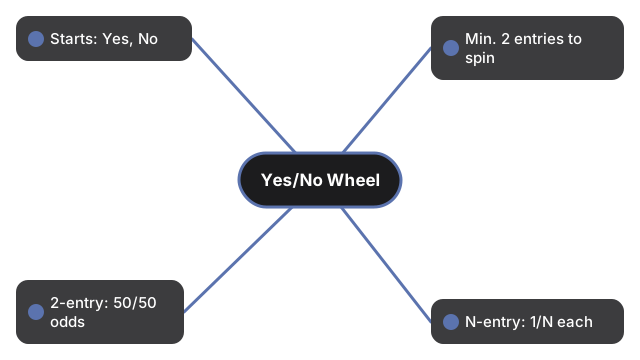
What loads by default on the Yes or No wheel is exactly two lines - "Yes" and "No" - so the wheel is ready to spin without typing; clear the box and paste any other list when you need more than a binary pick.
Turning it into a wheel for anything else
Turning it into a wheel for anything else: clear the Yes or No wheel text box and type your own list, one entry per line - two options, five options, or more - then Spin the same way.
| Setting | Default | Notes |
|---|---|---|
| Starting entries | Yes, No | Shown on page load, before you change anything |
| Minimum entries to spin | 2 | Fewer than 2 shows "Add at least two entries." |
| Odds per entry (2-entry wheel) | 50% / 50% | Equal slice per entry, regardless of line order |
| Odds per entry (N-entry wheel) | 1/N each | Every entry gets the same size slice |
How the spin is kept fair
The winning slice is chosen using your browser's crypto.getRandomValues, the same fairness source used by the site's other random-pick tools, so every slice has an equal chance no matter where it sits on the wheel or which line it was typed on. The spin runs entirely on your device - there is no server round-trip while it decides.
Yes or no wheel vs. the other random-pick tools
The yes or no wheel is built for a fast two-option call but is not limited to Yes/No - it is the same wheel-spinning mechanism as the wheel spinner, just pre-loaded with a shorter starting list. Use the coin flip instead when you want a Heads/Tails result with no spin animation, or the dice roller when you need a numeric one-to-six result.
Common uses
Common uses for the Yes or No wheel: settle a quick decision without overthinking, break a tie, or pick between two dinner options - or replace Yes/No with any custom two-or-more-line list.
What this tool does not do
What this tool does not do is remember your last Yes or No wheel list between visits - reload always returns to Yes/No - and it does not log outcomes or require an account.
The yes or no wheel does not remember your last list between visits - the page always reloads back to the Yes/No default. It does not weight one entry over another; every entry on the wheel has exactly the same odds, and nothing you type is uploaded or stored on a server.
Privacy
Privacy for the Yes or No wheel: picks run in this browser tab with no upload and no account - refreshing clears the last spin.
Companion tools
Companion tools beside the Yes or No wheel include Wheel Spinner for longer name lists, Coin Flip for a pure binary toss, and Dice Roller for tabletop checks.
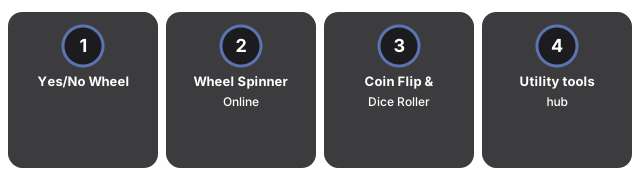
- Yes or No Wheel - the tool itself.
- Wheel Spinner Online - the same wheel with a longer starter list, for picking between names or options.
- Coin Flip Online and Dice Roller Online - other quick random-pick tools without a spinning wheel.
- Utility tools hub - the rest of the everyday conversion and generator tools on this site.
Frequently asked questions
Does the wheel always start on Yes and No?
Yes - the text box is pre-filled with "Yes" and "No" on every page load. Replace those two lines with your own list if you want to decide between other options instead.
Is a 2-entry wheel really a 50/50 chance?
Yes. Each entry gets an equal-size slice, and the winning slice is chosen with crypto.getRandomValues, so a two-entry wheel lands on each side about half the time over many spins.
Can I add more than two options?
Yes - type any number of entries, one per line, before clicking Spin. The wheel divides into one equal slice per entry no matter how many you add.
Is my list saved for next time?
No. Only the current list is shown - refreshing or leaving the page resets it back to the Yes/No default, and nothing is uploaded or stored on a server.
Why trust these tools
- Ten-plus years of web tooling. The freetoolonline editorial team has shipped browser-based utilities since 2015. The goal has never changed: get you to a working output fast, without an install.
- No install, no sign-up. Open a tool and get a working output in seconds - nothing to download and no account to create. Tools that need heavy processing run it on our service, so even a low-powered machine gets the job done.
- Analytics stops at the page view. We measure which pages get visited, not what you type or upload inside a tool. There is nothing to sign in to and no profile is attached to your input.
- Open-source core components. The processing engines underneath (libheif, libde265, pdf-lib, terser, clean-css, ffmpeg.wasm, and others) are public and audit-able. We link to each one in its tool page's footer.
- Free, with or without ads. All tools are fully functional without sign-up. The Disable Ads button in the header is always available if you need a distraction-free run.