Remove Objects From Photos Without Uploading - When To Use It
freetoolonline.com Editorial TeamUse the Object Remover when a person, a sign, or a watermark needs to disappear from a photo you would rather not hand to a website. You paint over the distraction, the painted area is filled back in with matching background, and the picture itself never leaves your browser.
The photo stays on your device
There is no server behind the page. The image is opened, masked, and filled entirely in the browser, with no account, no signup, and no tracking of what you edit. Nothing you open or produce is stored past the page session. When the AI model cannot load, the page does not quietly send your picture to a cloud service, because there is none to send it to: it offers the local Quick patch fill instead.
That settles the choice for photos you would not post publicly as they are - family pictures with a stranger in the frame, a screenshot with a name tag, a property photo with a visible plate. For an image that is already public, privacy stops deciding, and the question becomes whether a one-stroke fill beats opening a full editor.
Two ways to fill the gap, priced
Both fill paths run on your own device, and the page states what each costs before you commit to it.
| Path | First cost | What you get |
|---|---|---|
| Remove object (AI) | One-time model download of about 27 MB, started only by your click and cached by the browser | The painted region is filled with background that matches the surrounding scene |
| Quick patch | Zero download, instant | The painted region is filled from the surrounding pixels - lower quality than the AI model, but immediate and still fully local |
| Built-in example | Zero download, zero interaction | A prepared before-and-after pair renders when the page loads, so you can see the output shape before opening your own photo |
After the first AI run, later edits reuse the cached model, so the download is a once-per-browser cost rather than a per-photo one.
Where the AI fill is strongest
The model is at its best on clutter set against sky, walls, ground, water, or other repeating texture - the kinds of backgrounds it can plausibly continue. Painting tightly around the object, rather than sweeping a wide area, gives it less to invent and produces cleaner fills. Reviewing the result before you keep it is the intended habit: if the fill looks wrong, clear the mask and try a tighter stroke.
What it deliberately does not promise
This is not a magic eraser. The model invents plausible background; it does not recover the true scene that was hidden behind the object. Very large subjects in front of complex, non-repeating detail may not fill cleanly, and quality varies with the surrounding texture. It works on one image at a time - there is no batch or folder mode. And the AI path is not usable fully offline until the browser has cached the model: the first run needs a network fetch, though the Quick patch fallback never does.
When a neighbouring tool is the right call
Erasing an object and cutting out a subject are different jobs. If you want the background gone and the subject kept - a transparent PNG - that is the Background Remover, not this page. If the fix is really a recompose, Crop Image may remove the distraction along with the edge of the frame in one cut. For manual, layer-style adjustments, the Photo Editor gives you direct control instead of a model's guess.
Where to go from here
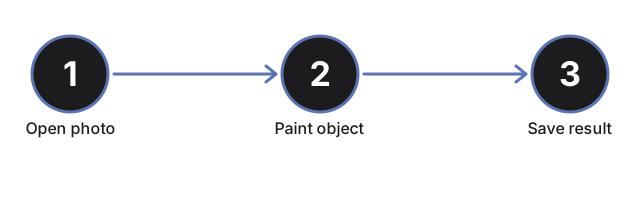
For the run itself - which control to touch in which order, from brush size to the saved PNG - see Remove an Object From a Photo in Your Browser - Step by Step. To weigh this page against cloud removal services and hand-editing, see In-Browser Object Remover vs Cloud Erasers and Manual Editing.
Why trust these tools
- Ten-plus years of web tooling. The freetoolonline editorial team has shipped browser-based utilities since 2015. The goal has never changed: get you to a working output fast, without an install.
- No install, no sign-up. Open a tool and get a working output in seconds - nothing to download and no account to create. Tools that need heavy processing run it on our service, so even a low-powered machine gets the job done.
- Analytics stops at the page view. We measure which pages get visited, not what you type or upload inside a tool. There is nothing to sign in to and no profile is attached to your input.
- Open-source core components. The processing engines underneath (libheif, libde265, pdf-lib, terser, clean-css, ffmpeg.wasm, and others) are public and audit-able. We link to each one in its tool page's footer.
- Free, with or without ads. All tools are fully functional without sign-up. The Disable Ads button in the header is always available if you need a distraction-free run.