How to Compress an Image to 50KB Online (Free)

Hitting a 50 KB image online is a quality trade handled in a few passes, not one button. Save the picture as JPG, drop it into a browser compressor, and lower the quality until the previewed result fits under your limit. The compressed copy shows beside the original, so you confirm the trade before you download.

Last reviewed: 2026-07-01

PropertyValue
FormatOnline, no install, no sign-up
CostFree
Implementing toolhttps://freetoolonline.com/image-tools/compress-image.html

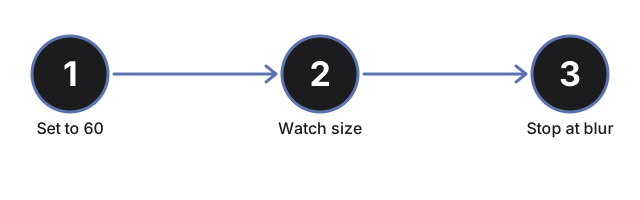
Three things decide whether you clear 50 KB. Format comes first: a PNG or HEIC screenshot holds detail that JPG discards, so save it as JPG before compressing, because a PNG often will not shrink far on its own. Dimensions come next: a 4000-pixel-wide photo sheds most of its weight if you scale it down with a resize tool before the quality step ever matters. Then quality: start near 60, read the previewed file size, and step the slider down until it fits. Because the result renders next to the source, you can stop one step above the point where softening becomes visible.

← Back to image editing tools

Why trust these tools

  • Ten-plus years of web tooling. The freetoolonline editorial team has shipped browser-based utilities since 2015. The goal has never changed: get you to a working output fast, without an install.
  • No install, no sign-up. Open a tool and get a working output in seconds - nothing to download and no account to create. Tools that need heavy processing run it on our service, so even a low-powered machine gets the job done.
  • Analytics stops at the page view. We measure which pages get visited, not what you type or upload inside a tool. There is nothing to sign in to and no profile is attached to your input.
  • Open-source core components. The processing engines underneath (libheif, libde265, pdf-lib, terser, clean-css, ffmpeg.wasm, and others) are public and audit-able. We link to each one in its tool page's footer.
  • Free, with or without ads. All tools are fully functional without sign-up. The Disable Ads button in the header is always available if you need a distraction-free run.

Related tools:

Tags: #image-editing

Related guides:

Loading reviews...

Frequently asked questions

What file format should I use before compressing to 50 KB?

Save the image as JPG before you open a compressor. PNG and HEIC files preserve detail that JPG discards, so a 1 MB PNG often will not shrink near 50 KB on its own - the format change alone can cut the size by 60 to 70 percent before quality ever matters. If the original is already JPG, skip straight to the quality and resize steps.

Does reducing image dimensions help hit the 50 KB limit?

Yes - dimensions and quality together control file size. A 4000-pixel-wide photo scaled down to 800 pixels before compression sheds most of its weight before the quality slider moves at all. Use a resize tool first, then apply quality compression; this two-step approach reaches 50 KB more reliably than quality-only compression on a large image.

How do I know when to stop lowering the quality setting?

The compress image tool shows the compressed file beside the original so you can compare them. Start near quality 60 and read the displayed file size; step the slider down until the size falls under 50 KB, then stop one step above the point where softening becomes visible. Softening usually first appears as blur around high-contrast edges like text and fine lines.