When to Use the 3I/ATLAS Interstellar Object 3D Explorer - Best Sessions and Limits
Open the 3I/ATLAS Interstellar Object 3D Explorer when you want to see how 3I/ATLAS's real orbit and activity compare against the two interstellar objects discovered before it - not to track 3I/ATLAS's current position (it passed perihelion in October 2025).
A three-way comparison, not a live tracker
A session starts on 3I/ATLAS (the default) to see its record eccentricity of about 6.1 and its confirmed water outgassing, then slides to Borisov (eccentricity about 3.36, CO-rich coma) and 'Oumuamua (eccentricity about 1.2, no coma at all) - while the comparison table stays fixed, ranking all three side by side.
Timing questions this 3I/ATLAS comparison does not answer
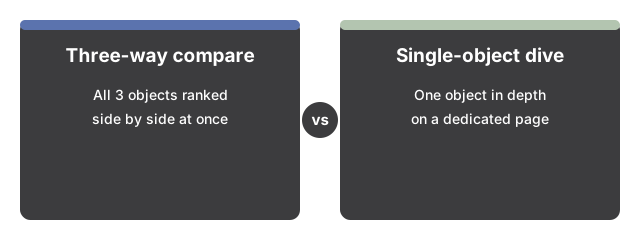
Two reader tasks fall outside this three-way interstellar timing comparison. First, plotting where 3I/ATLAS sits right now: the object rounded the Sun at perihelion in October 2025 and is already climbing back out of the solar system, so this scene freezes its record eccentricity of about 6.1 for study rather than following its live position. Second, a single-object deep dive: 'Oumuamua's tumbling motion and trajectory anomaly belong on the dedicated 'Oumuamua 3D Explorer, while Borisov's CO-rich coma set against a bound comet belongs on the dedicated 2I/Borisov Interstellar Comet 3D Explorer. Because 3I/ATLAS is a post-perihelion object rather than an upcoming event, the timing question here is comparing its confirmed water outgassing against Borisov and 'Oumuamua, not counting down to a future flyby. For a control-by-control walkthrough of this 3I/ATLAS explorer itself, open the step-by-step guide.
Why trust these tools
- Ten-plus years of web tooling. The freetoolonline editorial team has shipped browser-based utilities since 2015. The goal has never changed: get you to a working output fast, without an install.
- No install, no sign-up. Open a tool and get a working output in seconds - nothing to download and no account to create. Tools that need heavy processing run it on our service, so even a low-powered machine gets the job done.
- Analytics stops at the page view. We measure which pages get visited, not what you type or upload inside a tool. There is nothing to sign in to and no profile is attached to your input.
- Open-source core components. The processing engines underneath (libheif, libde265, pdf-lib, terser, clean-css, ffmpeg.wasm, and others) are public and audit-able. We link to each one in its tool page's footer.
- Free, with or without ads. All tools are fully functional without sign-up. The Disable Ads button in the header is always available if you need a distraction-free run.